

Jump to content

TLM

Member Since 10 Nov 2011
Offline Last Active Yesterday, 10:49 PM
-----

#58532 e-Sword 15.2.0 released 14 August 2026

Posted by TLM on 15 August 2026 - 12:51 AM

The following features are now included:

Navigation Sidebar can be closed. Select "Options, Display Navigation Sidebar" to toggle the option on/off.
Ancient Hebrew font support. Ancient Hebrew Lexicon is now a download module.
Bible Bookmarks have been redesigned.


In His service,

Rick Meyers


Click here to view the articles


Very encouraging how quickly Rick responded to the requests for this feature!
The only small issue is that version 15.2 doesn't keep previous settings. (Version 15 didn't either, but version 15.1 did.) But only a small inconvenience in an otherwise very good update.


#58188 Comments on UI changes in Version 15

Posted by TLM on 22 July 2026 - 09:12 PM

There may be problems that TLM noticed as follows "except from some font rendering issues the present version runs well under emulation."

I find that some of the Hebrew and Greek and Latin letters that were modified with dieresis marks under or over the letter characters were displayed with an open check box when using the default Verdana font. You can try to change the Font in e-Sword on "Options", "Font settings...", so that the Default Font is changed from True Type Verdana to the True Type Times New Roman, instead, which has the necessary characters, and is likely to have already been provided on your Linux system. 


My system is a ARM64 Windows device. The font problem I'm having with it is that regardless of what font I choose, all module panes (Bibles, commentaries, dictionaries) are always rendered in Arial. Only the Editor pane showing user files display the correct font. From what I've researched the Editor panes use a standard Windows RichEdit control, which is fully compatible with ARM. The module panes seem to use the embedded legacy Internet Explorer / MSHTML engine.


I also have e-Sword on an Intel based Windows device with the exact same modules, fonts, etc. and it renders everything correctly. So, the issue seems to have something to do with the legacy Internet Explorer / MSHTML engine running under emulation on an ARM64 device. AI thinks this is a problem with the interaction of e-Sword and WebView2 under ARM64 emulation. I've passed that on to Rick to see what he thinks.


#58172 Comments on UI changes in Version 15

Posted by TLM on 21 July 2026 - 04:54 AM

After using version 15 for almost a week, I'm starting to really like it.

  • Having to use drop down menus where in past versions everything was visible hasn't been as much of a problem as I thought it would. The positive trade-off is the clean interface, which I definitely prefer now over previous versions.
  • I initially felt that having only pre-set views was limiting, but I enjoy using the new view layouts now to quickly switch between views. Also, the Study View in the Bible pane is great - a small addition that's really helpful.
  • I don't feel that getting to know version 15 would be any more difficult for a new user than with previous versions. Almost all functions are intuitive.
  • Also, the program starts faster and just seems quicker when loading large module content.

My hope for future updates is a native ARM64 build, but except from some font rendering issues the present version runs well under emulation.


After my initial skepticism I feel version 15 is a successful redesign that gives e-Sword a modern and intuitive interface.


#58149 e-Sword 15 and Tooltip NT

Posted by TLM on 16 July 2026 - 09:28 PM

Only a few my Bibles that were already in html moved from the old location to the new one, all of my topx did convert to topi and move over. My commentaries and dictionaries did not convert. This is why Rick suggested running e-Sword 15 as an administrator due to issues with the ProgramFiles(x86) folder which requires administrator privileges. Again this what Rick said in response to question that I sent on the official e-Sword site.


e-Sword 15 only converts user files when first started, such as journals, study notes and topic files - not Bibles, commentaries or dictionaries. You have to find the HTML-based versions of these


#58137 e-Sword 15 and Tooltip NT

Posted by TLM on 16 July 2026 - 10:18 AM

Only one location can be changed with e-Sword 15 Resources Settings. When e-Sword 15 installs it creates new location for all e-Sword files located in the following folder: C:\ProgramData\eSword.
This new location is preset in the e-Sword Resources Settings and can not be changed. e-Sword 15 will automatically convert your modules to the proper file format and move them to the new location for e-Sword when you first launch it, though you my need to run it as an administrator when you first launch it in order for the conversions and relocations to happen.


"This new location is preset in the e-Sword Resources Settings and cannot be changed."

I'm happy to say this isn't true. I was able to change both the Resources location and the User Files location in "Options/Resource Settings" to my OneDrive folder in order to sync resources between devices. Works without any problems.
But you have to keep the default e-Sword resources in C:\ProgramData\e-Sword - or it will refresh the install when you restart e-Sword.


#58125 Comments on UI changes in Version 15

Posted by TLM on 15 July 2026 - 10:50 PM

I just installed version 15 on a separate PC for testing. I'm curious how other users view the new UI. Here are my first impressions:

First off: I like the fresh appearance - looks very modern compared to previous versions. But: many things I use daily are hidden or require more clicks to access. Here are a few examples:

  • In previous versions all options in the Editor pane are visible. In version 15 they are placed behind tabs with different categories: "File, Edit, Format" etc. Looks nice, but requires an extra step to implement.
  • In previous versions all my installed Bibles are visible and listed horizontally in the Bible pane. Now they are placed in a drop down menu. Looks tidy, but again, it requires extra steps to quickly change Bible versions.
  • In previous versions the Commentaries and Dictionaries were accessible in the far left vertical pane. It was possible to have any combination of Bible, Editor, Dictionary, Commentary. Now only pre-set views are available in a drop down menu.
  • Also - just like in the Editor and Bible pane - in previous versions all Commentaries and Dictionaries were visible and could be quickly changed between. Now these too have been placed in a drop down menu. Tidy, but requires more steps to access.

My initial impression: e-Sword 15 looks fresh and modern, and for casual or new users is probably a real upgrade. But for my daily use the functions and resources I need are not all visible in a unified overview and require more steps to access.
But these are just my initial impressions and may change after I get more accustomed to them.


What do you think about the major interface changes in version 15?


#50042 Update e-Sword for a new generation of computers

Posted by TLM on 21 May 2026 - 09:53 PM

One of my Windows apps was recently updated, with this comment: ". . . is now a native 64-bit and ARM64 app."

I hope we will be able to say this about e-Sword soon. Computer architecture is evolving, but e-Sword unfortunately is not keeping up.

I really want this app that I've used almost daily since 2007 to be ready for the new generation of computers.


#49787 E-sword not opening

Posted by TLM on 23 March 2026 - 10:16 PM

The real solution to this issue - and similar ones others are reporting in the forums - is not to somehow get Microsoft to make a legacy Media Player available that was released with Windows 7 - 17 years ago! - but to make e-Sword not dependent on outdated elements Microsoft has begun systematically deprecating.

e-Sword needs to be updated to run in the modern world of 64-bit and ARM based computers. Otherwise, e-Sword has hit a dead end. That would be tragic knowing the history of this app we all love.


#49603 e-Sword on Windows on ARM

Posted by TLM on 28 February 2026 - 04:56 AM

e-Sword won't run on my Windows device running on ARM. Starting in Version 13 e-Sword requires the legacy Windows Media Player (old!), which my ARM device won't allow to be installed/activated.

Is anyone else using e-Sword on a Windows machine running on ARM? Did you somehow get it to run without the legacy Media Player or were you able to install the Media Player on your ARM device?

I would rather not have to go back to Version 12.2 just because of the requirement for a Media Player no longer in active use or development, so any suggestions are appreciated!


#49590 Bibles showing in different fonts

Posted by TLM on 27 February 2026 - 01:26 AM

Under "Options/Font Settings" I have the same font set for "Default Font" and "Editor Font". In the Editor pane this font is always used. But in the Bible pane some Bibles use it, but others don't. Those Bibles not using the set default font use Arial.

I've used e-Sword for many years and never had this problem before. I presently use e-Sword on 2 PCs: an Intel machine and a machine running Windows on ARM. On the Intel machine all Bibles use the right font, but on the machine running Windows on ARM some Bibles don't use the set default font.

Anyone else ever have this issue? Any idea how I can force e-Sword to use the default font on all Bibles?


#34740 Problems with e-Sword version 11.2.2

Posted by TLM on 24 November 2018 - 10:12 AM

Jon, thanks for posting Rick's email.


I just installed e-Sword from the "new" download file of version 11.2.2 "as Administrator" and it now starts and runs normally. The installation from the "old" download file failed to start on this PC earlier, so it seems the problem may be solved.


Hope others who were having problems before have the same positive experience as I . . .


#34737 Problems with e-Sword version 11.2.2

Posted by TLM on 24 November 2018 - 03:36 AM

Use System Restore to roll back to a state before you updated e-Sword

That's the only thing that worked for me. Hoping for a real fix soon . . .


Concerning Windows update as a possible cause: that's not the source of the problem, but rather compatibility issues with the text control e-Sword uses from another vendor. What causes them is still a mystery . . .


#34698 Problems with e-Sword version 11.2.2

Posted by TLM on 20 November 2018 - 02:15 AM

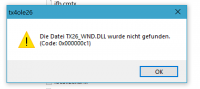
Just installed the latest version (11.2.2 dated Nov. 19, 2018). When I tried to run e-Sword I got this error message. (See attached image.) Anyone else having the same problem? Unfortunately I didn't keep the download of version 11.2.1, which worked great. So I'm presently not able to use e-Sword . . .

Attached Thumbnails

  • 2018-11-20.png


#10596 User font settings in modules

Posted by TLM on 02 July 2012 - 10:25 AM

I know it's only a "cosmetic" problem, but this issue of varying font styles, sizes, etc. makes e-Sword sometimes look very unprofessional, which is sad considering the program's otherwise powerful features. I hope in a future update that it'll be possible for each user to set default font settings of his choice that apply across the board to every aspect of e-Sword: Bibles, dictionaries, commentaries, reference and topic materials, etc. without exception.

Until then it unfortunately often has the amateurish appearance of being a container of randomly formatted materials lacking any consistency. E-Sword deserves better!


#10594 User font settings in modules

Posted by TLM on 02 July 2012 - 10:13 AM

I use Times New Roman 12 as my standard font for just about every .topx./.refx module I build. Old habits die hard.


Most of those familier with typography say that Times New Roman is the font that should be avoided if at all possible.